Documentation
A complete guide to installing, configuring, operating, and extending aricode in real codebases. This page is intentionally detailed: it is meant to be the reference manual for the CLI, REPL, knowledge graph, dreaming system, and safety model.
aricode is a behavior-first coding agent for local or self-hosted models. It is designed to let the model read, edit, test, plan, and explore autonomously while keeping command execution and file mutation inside explicit guardrails.
Current desktop release: v0.5.2. Introduces Aricode Desktop (a native macOS app), session persistence across restarts, provider management, the Golden Thread visual rebrand, streaming transcript display, conversation search/export, inline diff viewer, integrated terminal, and knowledge graph visualization.
Companion release: AriCore v0.5.1. AriCore now syncs across your iPhone, iPad and Mac through your private iCloud. A new opt‑in Marketplace lets you share plugins, skills and personas with everyone else running AriCore. Personas gets its own bottom‑bar tab in Solo, sitting between Study and Browse. Memory is smarter: a new activity category decays over a week or two so transient context doesn't crowd durable traits, and a similarity check stops the model writing the same fact six ways. Dreams gain swipe‑to‑dismiss and check for duplicates before proposing new memories. See the AriCore section below.
Overview
aricode combines four things that most CLI coding agents keep separate: an interactive REPL, a persistent project memory, a codebase knowledge graph, and an autonomous exploration mode called dreaming. The result is a local-first agent that does not need to rediscover your project from scratch every time you open it.
The core operating model is simple:
- You provide a task, question, or planning request.
- The model receives tools for reading files, editing code, running approved commands, querying the world model, and spawning bounded subagents.
- aricode records what the model learns into persistent artifacts, updates the knowledge graph live, and uses that state to improve later work.
Requirements
| Requirement | Notes |
|---|---|
| Node.js 22+ | The current CLI and Ink-based terminal UI target Node 22 or later. |
| npm | Used for global installation, linking, and development builds. |
| OpenAI-compatible model backend | Ollama works well by default, but any compatible endpoint can be used if it supports the required chat + tool-calling flow. |
| Local repo checkout | aricode is built for real project directories, not isolated code snippets. |
For the smoothest experience, use a terminal with standard ANSI support and a model that is genuinely capable of code editing, tool use, and longer reasoning loops.
Installation
The easiest path is the install script. It downloads the current public release tarball from install.aricode.dev/releases/, installs it globally, and verifies the command surface.
curl -fsSL https://install.aricode.dev | shIf you want to inspect the exact public package being installed, you can fetch the versioned release tarball directly:
curl -O https://install.aricode.dev/releases/aricode-0.5.2.tgz
npm install -g ./aricode-0.5.2.tgz
For local development from a checkout:
npm install
npm run build
npm link
Verify the install:
aricode --version
aricode --help
aricode is the product name, npm package name, and global command. Existing workspaces under older .ariadne paths are migrated automatically. The public installer currently uses versioned tarballs on install.aricode.dev; a registry-based install flow can be layered on later without changing the CLI surface.
First Launch
Run aricode inside a project directory:
cd your-project
aricode
On the first launch in a workspace, aricode initializes session state and attempts to load a persisted knowledge graph for that project. If none exists, it offers to build one. The REPL then becomes your persistent operating surface for that workspace.
1. Start the REPL
Open the project directory and run aricode.
2. Build graph state
Accept the knowledge graph build if this is the first run.
3. Generate memory
Run /init to create .aricode/ARICODE.md.
4. Start working
Ask for a task directly, or use /plan if you want a reviewable plan first.
/init
/dream
/plan refactor the auth middleware to support JWT
fix the null pointer in src/parser.js
Operating Modes
aricode can be used in three primary ways:
| Mode | When to use it | Example |
|---|---|---|
| Interactive REPL | Ongoing multi-turn work, planning, debugging, patch review, dreaming, and graph-aware exploration. | aricode |
| One-shot instruction | Single task from a shell pipeline or quick scripted usage. | aricode "explain the authentication flow" |
| Explicit one-shot pipeline | Direct non-REPL execution via slash-style task routing. | aricode one "add error handling to fetchUser" |
The interactive REPL is the most capable mode. It is where planning, dreaming, transcript history, patch review, and session continuity all come together.
Configuration
aricode keeps a mix of global and per-project state. Global provider information lives outside the project, while project artifacts live under .aricode/. Existing legacy state is migrated automatically on first run.
~/.aricode/providers.json- Provider definitions, base URLs, active provider state, and related backend configuration.
~/.aricode/{workspaceHash}/- Persistent session state keyed by workspace path. Stores transcript history, summaries, and session configuration.
.aricode/- Project-local artifacts such as the knowledge graph, dream outputs, plans, memory, and hooks.
You can change the active model, backend, profile, context size, and context includes from inside the REPL at any time.
/model qwen2.5-coder:32b
/backend http://localhost:11434/api
/profile compact
/ctxsize 128000
/include src
/include test
/files
Providers & Models
aricode is backend-agnostic as long as the endpoint behaves like the OpenAI chat completions API and the selected model can reliably handle coding tasks and tool calling. In practice that means local Ollama, llama.cpp-based stacks, vLLM deployments, LM Studio, and other compatible systems all fit.
Ollama
ollama pull qwen2.5-coder:32b
aricode --base-url http://localhost:11434/api --model qwen2.5-coder:32b
You can also configure this interactively:
/backend http://localhost:11434/api
/model qwen2.5-coder:32b
Other OpenAI-compatible endpoints
/backend https://your-endpoint.example/v1
/model your-model-name
/provider list
/provider add
Model quality matters more than raw context size. aricode can manage context and structure, but it still depends on the backend model being competent at code reasoning, tool choice, and following long-running workflows.
Project Layout
After initialization and use, you should expect aricode to maintain the following project-local structure:
.aricode/
  ARICODE.md
  graph/
  dream/
  plans/
  hooks.json
And the following global structure per workspace:
~/.aricode/
  providers.json
  {workspaceHash}/
    session.json
    transcript.jsonl
    summary.md
The exact contents grow over time as the agent works, dreams, plans, and accumulates project memory.
REPL Workflow
The REPL supports both direct natural-language tasks and slash commands. A typical work session looks like this:
- Open the project and let aricode load or build the graph.
- Run
/initif you want a fresh project memory file. - Ask for direct work, or use
/planto separate planning from execution. - Review pending patches with
/diffand apply with/apply. - Use
/history,/status,/graph, and/dreamas persistent support tools.
/status
/graph stats
/plan add structured logging to the worker queue
/execute
/diff
/apply
Command Reference
The REPL exposes a fairly broad slash-command surface. The list below reflects the currently shipped command registry.
Session & UI
| Command | Purpose |
|---|---|
/help | Show available commands. |
/status | Show session status and current state. |
/view [ambient|focus|verbose] | Set transcript detail level. |
/focus | Toggle focus view. |
/verbose | Toggle verbose view. |
/history | Show recent transcript history. |
/new | Start a fresh conversation in the current workspace. |
/reset | Reset workspace state. |
/exit | Exit the REPL. |
/copy [all] | Copy the last response or the full transcript to the clipboard. |
Models, Providers & Context
| Command | Purpose |
|---|---|
/model <name> | Switch the active model. |
/backend <url> | Switch the active backend URL. |
/provider [add|list|name] | Manage provider definitions. |
/profile <name> | Set the working profile, such as compact or balanced. |
/context [text|clear] | Set or clear persistent context. |
/ctxsize <tokens> | Set context window size. |
/include <path> | Add a file or directory to context includes. |
/drop <path> | Remove an include path. |
/files | List currently included paths. |
Task Execution
| Command | Purpose |
|---|---|
/one <task> | Run the one-shot pipeline. |
/run <task> | Run the main agent loop on a task. |
/plan <task> | Explore the codebase and create a plan. |
/sectmode [on|off|status|init] | Toggle section mode, check status, or initialize a section manifest. When active, tasks are distributed across code sections by a master planner. Use /sectmode apply-proposal to accept and /sectmode reject-proposal to decline a structural change proposed by the master. |
/execute | Execute the last approved plan. |
/diff | Preview the pending patch. |
/apply | Apply the pending patch. |
/write <path> | Write the last code output to a file. |
/spawn <task> | Run a background task. |
Codebase & System Inspection
| Command | Purpose |
|---|---|
/read <path> | Read a workspace file. |
/search <pattern> | Search workspace files. |
/test <cmd> | Run tests. |
/shell <cmd> | Run a shell command directly. |
/git [subcommand] | Run git commands. |
/symbols [file] | List indexed symbols. |
/callers <name> | Find call sites. |
/wm <query> | Query the world model. |
/graph [on|off|query|explain|stats] | Inspect or control the knowledge graph. |
/store [conflicts|query <type>] | Inspect the state store. |
Memory, Setup & Dreaming
| Command | Purpose |
|---|---|
/setup | Re-run the setup wizard. |
/init | Generate project memory in .aricode/ARICODE.md. |
/memory | Show stored memories. |
/forget <key> | Remove a memory. |
/dream [browse|summary|explore] | Run or inspect autonomous codebase exploration. Use --depth shallow|deep|intensive to control exploration depth and --focus <area> to target a specific part of the codebase. browse opens the dream artifact browser, summary shows the journal, explore shows the futures tree. |
/privileged [on|off] | Toggle privileged command mode. |
Knowledge Graph
The knowledge graph is aricode’s persistent structural memory of the codebase. It is not just a file index. It tracks symbols, imports, ownership relationships, runtime-adjacent structure, provenance, and higher-value relationships such as mirrors or connected modules.
Tracked entities
Files, functions, classes, methods, constants, and higher-order project concepts.
Relationships
Imports, calls, ownership, inheritance, type references, mirrors, and semantic links.
Provenance
Last commit, author, date, and related metadata for indexed files where available.
Live updates
Reads, writes, and edits feed back into the graph during active sessions.
The graph supports status views, codebase queries, context generation, and dream targeting. It is one of the main reasons aricode gets better on later sessions instead of remaining stateless.
/graph
/graph stats
/graph query auth middleware
/graph explain parser tokenizer
Project Memory
aricode maintains a persistent project memory file at .aricode/ARICODE.md. Older memory files are migrated automatically. It is intended to capture durable architectural context, conventions, terminology, and known constraints that should inform every later turn.
The memory file is generated by /init and enriched from several sources:
- Knowledge graph summaries and high-value symbols.
- Dream findings and architectural observations.
- Convention extraction from the codebase.
- Manual human edits.
If you want aricode to internalize a non-obvious project rule, ARICODE.md is the canonical place to put it.
Autonomous Dreaming
Dreaming is aricode’s autonomous exploration mode. Instead of waiting for a task, aricode walks the codebase with a phased strategy and produces durable artifacts for later use. Dreaming is useful when a codebase is large, under-documented, or evolving quickly.
Dream phases
- Survey identifies important files, high-centrality symbols, and structural hotspots.
- Triage clusters likely areas of interest or risk.
- Deep Dive investigates concrete questions in targeted areas.
- Futures maps likely future directions, risks, and refactor opportunities.
- Synthesis writes the results back out as durable artifacts.
/dream
/dream --depth shallow
/dream summary
/dream browse
/dream explore
Artifacts are written under .aricode/dream/ and can later feed planning, memory generation, and graph-guided retrieval.
Dream tool restrictions
During dreaming, the model operates in a read-only sandbox. It cannot edit files, run shell commands, submit plans, or ask the user questions. The only exception is the synthesis phase, which is allowed to write files — but only to the .aricode/dream/ directory. This prevents the agent from accidentally modifying your codebase while exploring it.
Dream depth
| Depth | Turn budget | Best for |
|---|---|---|
shallow | ~30 turns | Quick survey of a new codebase. Identifies structure and high-level patterns. |
deep (default) | ~80 turns | Full exploration. Investigates threads, resolves questions, maps futures. |
intensive | ~150+ turns | Deep investigation with no thread cap. Each thread gets generous budget. Use for thorough analysis of complex codebases. |
Dream context
When dream context is enabled (/dream context on or via the settings toggle), aricode automatically injects relevant findings from past dreams into your task prompts. This gives the model background knowledge about your codebase without you having to explain it. Dream context is injected as a read-only preamble — the model can use it if relevant, but isn't forced to.
Dream artifacts
| File | Contents |
|---|---|
dream_journal.md | Narrative summary of what was explored and found. |
findings.json | Structured findings with confidence scores. |
futures_tree.md | Predicted future directions, risks, and refactor opportunities. |
dream_state.json | Internal state for incremental dreaming (threads, budget tracking). |
codebase_map.md | High-level map of the codebase structure. |
conventions.json | Detected coding conventions and patterns. |
Interrupting a dream
You can stop a dream at any time with Ctrl+C (CLI) or the Stop button (desktop). Partial results are saved after every phase, so an interrupted dream still produces useful artifacts. The abort signal propagates through all phase runners and the underlying agent loop.
Planning & Execution
aricode separates planning from execution when you want it to. Planning mode is ideal for larger refactors, multi-step migrations, and work that should be reviewed before code is touched.
/plan migrate the worker queue to structured events
/execute
Typical flow:
- Run
/plan <task>. - Review the generated plan and any clarifying questions.
- Approve or revise the plan.
- Run
/executewhen ready. - Inspect pending changes with
/diffand apply with/apply.
For smaller tasks, you can skip planning and ask directly in natural language or via /run.
Section mode
For larger apps with clear ownership boundaries, section mode lets a master planner split a task into narrower briefs for section-scoped agents. The master sees the broad conversation context; section agents stay constrained to the files defined in the section manifest.
Setting up section mode
/sectmode init    # Generate a section manifest from your project structure
/sectmode on      # Enable section mode for subsequent tasks
/sectmode status  # Check current section mode state
/sectmode off     # Disable section mode
The manifest lives at .aricode/sections/manifest.json and defines which files belong to which section. Each section has an id, label, description, and file list. The master planner reads this to decide how to distribute work.
How execution works
- You submit a task via
/runor natural language. - The master planner analyzes the task and decides which sections need changes.
- If the master thinks the section structure should change, it proposes a resector. You can accept with
/sectmode apply-proposalor reject with/sectmode reject-proposal. - Otherwise, it dispatches work to section agents — each one operates within its file scope.
- A verifier agent checks cross-section consistency after all section agents finish.
- The master writes a final summary.
Section ID resolution
Section IDs can be matched by exact ID, normalized ID (lowercased, stripped), or slugified label. For example, a section labeled "User Interface Components" can be dispatched to as user-interface-components, user_interface_components, or the canonical ID from the manifest.
Subagents
For broader or parallelizable work, aricode can spawn subagents. These are bounded agents with inherited context and constrained capabilities. They are useful for large codebase exploration or breaking down a complex problem without flooding the main context with raw intermediate work.
| Type | Purpose |
|---|---|
| General | Full-capability worker for broad subtasks. |
| Explore | Read-only research and codebase mapping. |
| Plan | Strategy generation without direct code mutation. |
Subagents inherit the main session’s safety model and are subject to concurrency and budget limits so they remain support workers, not uncontrolled autonomous branches.
Tool Surface
The model-facing tool surface is what turns aricode from a chat shell into a coding agent. The exact implementation evolves, but the current core toolset centers on file access, editing, shell execution, graph queries, scratchpad state, planning, and lifecycle control.
| Tool | Purpose |
|---|---|
read_file | Read a file, optionally within line ranges. |
list_files | Find files without reading their contents. |
search | Search text across the workspace. |
edit_file | Apply targeted search/replace edits. |
write_file | Create or overwrite files. |
run_command | Run an allowlisted shell command. |
fetch_url | Fetch a URL as text. |
query_codebase | Query indexed symbols and graph state. |
analyze | Run deeper structural analysis. |
scratchpad | Persist structured notes within the session. |
spawn_agent | Launch a bounded subagent. |
submit_plan | Submit a plan from planning mode. |
request_more_steps | Ask for additional reasoning budget. |
ask_user | Request human input when needed. |
finish | Complete the current task. |
Command Safety
aricode uses a default-deny command policy. The model cannot simply run arbitrary shell code. Commands are classified into tiers, validated, and either allowed, blocked, or escalated into an approval flow.
| Tier | Typical behavior | Examples |
|---|---|---|
| Read-only | Generally auto-approved. | ls, cat, grep, find, git status |
| Mutating | Requires normal approval or policy allowance. | npm run build, eslint --fix, git commit |
| Privileged | Requires explicit privileged enablement. | npm install, networked installs, broader system modification |
Environment variables are sanitized before agent-executed commands. Sensitive keys and tokens are stripped from the command environment unless you deliberately opt into a broader mode.
/privileged on
/privileged off
Context Management
aricode actively manages the conversation context to stay within the model's context window. This happens automatically — you don't need to configure it unless you want to.
How compaction works
When the conversation history approaches the context window limit (set by /ctxsize or --max-context-tokens), aricode runs a multi-stage compaction:
- Micro-compaction — removes old tool results that are no longer relevant (e.g., file reads from 20 turns ago).
- Knowledge extraction — pulls durable facts from the conversation into the knowledge graph before dropping them.
- Summarization — condenses older conversation turns into a compact summary that preserves key decisions and context.
- Rehydration — rebuilds the context window with the summary, recent turns, and active tool state.
Compaction is visible in the REPL as a ⟳ status message. In the desktop app, the spinner mode changes to "requesting" during compaction.
Persistent context
You can inject fixed text into every prompt using /context. This is useful for project-specific instructions that should always be present:
/context This project uses SQLAlchemy 2.0 async style. Always use async session.
/context clear
Include paths
Files added with /include are read and injected into the system prompt on every turn. Use sparingly — each included file consumes context window budget.
/include src/core/types.ts
/include docs/architecture.md
/files    # List current includes
/drop src/core/types.ts
World Model
The world model is aricode's in-memory representation of your codebase structure. It's built from AST parsing and updated live as the agent reads and edits files. The knowledge graph builds on top of it.
What it tracks
- Symbols — functions, classes, interfaces, type aliases, and their locations.
- Dependencies — import/export relationships between files.
- Call sites — where functions are called from.
- Change tracking — which files have been modified since the last test pass.
- Convention patterns — naming conventions, file organization patterns, recurring structures.
Querying
/symbols              # List all indexed symbols
/symbols src/app.ts   # Symbols in a specific file
/callers handleSubmit # Find all call sites for a function
/wm summary           # High-level world model summary
/wm deps src/app.ts   # Dependencies of a file
The world model is also available to the agent during execution — it uses it to understand code structure before making edits, and to assess the blast radius of changes.
Behavioral Compilation
When aricode reads structured test failures or runtime evidence, it can extract behavioral witnesses and compile them into a repair-focused behavior patch. This helps the agent distinguish between incidental code changes and actual contract-level corrections.
BEHAVIOR PATCH
Iteration 2: 8 -> 3 witnesses

REPAIR: normalizePhone (src/phone.js:5)
  equality: "(415) 555-0100" -> "+14155550100"
This system is especially useful when several failing tests reduce to one root-cause function or contract mismatch.
Edit Intelligence
aricode does not treat file mutation as the end of the story. After edits, it can run a secondary layer of analysis that checks whether the change is plausible in the context of the project.
- Linting for supported languages.
- Convention checks against existing naming and structure patterns.
- Blast-radius awareness through graph dependencies and mirrors.
- Regression cues from previously observed behavioral evidence.
- Optional hooks for formatting or custom automation.
Hooks System
Hooks let you attach your own automation to aricode lifecycle events. They are configured in .aricode/hooks.json and can be used to run formatters, local checks, setup scripts, or custom telemetry.
{
  "hooks": {
    "post-edit": ["npm run lint --fix ${file}"],
    "post-write": ["prettier --write ${file}"],
    "pre-command": ["echo 'Running: ${command}'"],
    "post-command": ["echo 'Finished: ${command}'"],
    "session-start": ["echo 'Session started'"],
    "session-end": ["echo 'Session ended'"]
  }
}
Hook output is incorporated back into the working session so the model can react to it.
Desktop App
Aricode Desktop is a native macOS application that provides a graphical interface for the aricode agent. It uses the same SDK and agent loop as the CLI — your providers, sessions, and project memory are shared between both.
Download: Aricode-0.1.0-arm64.dmg (macOS, Apple Silicon, ~97 MB)
Installation
Download the .dmg file, open it, and drag Aricode to your Applications folder. No other dependencies required — the aricode SDK, ripgrep, and all tools are bundled inside the app.
On first launch, the onboarding wizard will walk you through connecting to a model backend. You can choose from presets (Ollama, LM Studio, OpenAI, OpenRouter) or enter a custom URL. Your provider configuration is saved to ~/.aricode/providers.json and shared with the CLI.
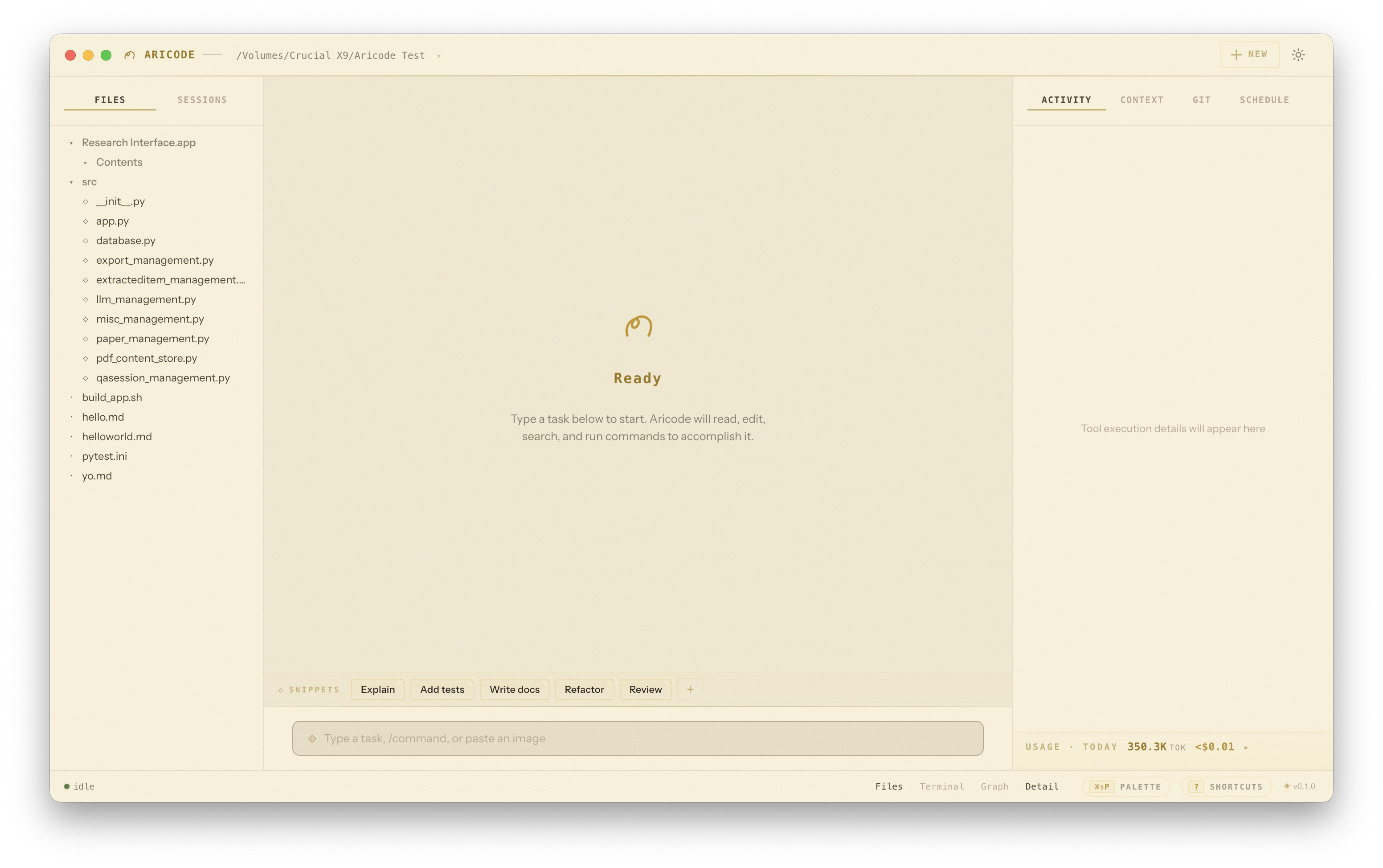
Layout & Panels
The app uses a three-panel layout wrapped by a custom title bar (with a workspace switcher on the left and a gear icon on the far right that opens Settings) and a status bar along the bottom:
| Panel | Content | Toggle |
|---|---|---|
| Title bar | Workspace picker with recent-workspaces dropdown; settings gear on the top-right | Always visible |
| Left — Sidebar | File tree with git diff badges (Files tab) and per-workspace session history (Sessions tab) | ⌘\ or status bar button |
| Center — Conversation | Streaming transcript, pinned messages rail, snippet bar, input composer, conversation minimap on the right edge | Always visible |
| Right — Detail | Tabs for Activity, Context, Git, Schedule. Footer shows today's usage and links to the full dashboard. | ⌘⇧\ or status bar button |
| Status bar | Agent status dot + current phase, view toggles, token counters, shortcut chips (⌘⇧P, ?), version glyph | Always visible |
Additional overlays can be toggled from the status bar or keyboard:
- Terminal — a PTY-backed shell pane below the conversation (⌘`). Its color palette follows the active theme.
- Knowledge Graph — a full-screen force-directed visualization of your codebase (⌘G).
- Focus mode — hides all chrome, showing only the conversation and input (⌘⌃F; Esc to exit).
- Settings modal — a right-side slide-in drawer with six sections: Providers, Connection, Model, Tuning, Agent, Appearance (⌘, or the top-right gear).
Conversation minimap
Once a conversation has more than three messages, a slim vertical rail appears on the right edge of the transcript. Each message is a tick coloured by role (amber for user, chalk for assistant, muted for system). Hover to reveal a viewport indicator that mirrors your scroll position, and click any tick to jump to that message. The rail fades to 35% opacity when you're not hovering over the conversation.
Pinned messages
Hover any assistant message to reveal a ◇ pin button on the top-right of its header. Click to pin; pinned messages get an amber thread marker in their left margin and surface in a "PINNED" rail above the transcript. Click any chip to jump back to that message. Click the × on a chip to unpin.
System row for slash commands
When you run a slash command that doesn't reach the model — /help, /status, /diff, and so on — a compact one-line system row appears in the conversation confirming what happened (e.g. ◇ /help · Opened command reference). Only task-style commands (/run, /plan, /execute, /one) are forwarded to the agent.
Command Palette
Press ⌘⇧P anywhere in the app to open the command palette — a fuzzy-searchable launcher for every action, slash command, and navigation target. It groups results by category (Go To, Commands, Workspace) and shows the keyboard shortcut for each entry so you learn them over time. ↑/↓ navigates, ↵ runs, Esc closes.
Keyboard cheatsheet
Press ? with the input unfocused to summon the keyboard cheatsheet — a four-column grid of every shortcut, grouped by General, Workspace, View, and Agent. The status bar also exposes shortcut chips (⌘⇧P Palette and ? Shortcuts) for discoverability.
Sign in with ChatGPT
If you have a ChatGPT Plus/Pro subscription, aricode can authenticate directly against your ChatGPT account instead of asking for an API key. Your conversations are billed against your subscription's quota, not against pay-per-token API credits.
The flow is standard OAuth 2.0 with PKCE, using OpenAI's public Codex CLI client — the same credential Apple's own Codex and the OpenCode plugins use.
How it works
- Click Sign in with ChatGPT in the onboarding wizard, or open Settings (⌘,) → Providers and click the gold Sign-in card.
- Aricode spins up a temporary loopback HTTP server on
http://localhost:<random-port>and opens your default browser toauth.openai.com/oauth/authorize. - Log in with your ChatGPT account in the browser. Approve the requested scopes.
- OpenAI redirects back to the local loopback URL with an authorization code. Aricode exchanges it for an access token + refresh token, writes them to
~/.aricode/auth.jsonat mode0600, and closes the local server. - The ChatGPT provider is added to your Providers list and made active. Start chatting.
Scopes requested
| Scope | Why |
|---|---|
openid | Standard identity scope |
profile | Your display name for the active-session label |
email | Shown in Settings to confirm which account you're signed in as |
offline_access | Issues a refresh token so you stay signed in across restarts |
api.connectors.read | Read access needed for the ChatGPT backend API |
api.connectors.invoke | Sends your prompts + tool calls through your subscription |
Models available
Which models you can actually use depends on your ChatGPT plan, not on aricode. Plus accounts typically get GPT-5 and GPT-5 Codex; Pro plans get higher context windows and priority routing. If a model isn't in your plan, the request fails with a 403 and you can pick a different one in Settings → Model.
How aricode talks to ChatGPT
ChatGPT-OAuth tokens aren't accepted on the standard api.openai.com/v1 API. They authenticate against chatgpt.com/backend-api, which uses the Responses API (not Chat Completions). Aricode ships a small adapter (desktop/main/chatgpt-responses.ts) that translates the agent's tool-using chat turns into Responses API calls and streams the results back in the format the SDK expects. All of this is transparent — you just pick the provider and chat.
Token lifecycle
- Access token — short-lived (typically 1 hour). Stored as
access_tokeninauth.json. - Refresh token — long-lived. Used to silently mint a new access token when the current one is within 5 minutes of expiry. Every outbound request calls
refreshIfNeeded()before firing. - ID token — parsed once at login to extract your ChatGPT account id + org id + project id (from the
https://api.openai.com/authclaim namespace). These are sent as thechatgpt-account-idheader on every request.
Signing out
Open Settings → Providers → click Sign out on the ChatGPT row. This removes the ChatGPT provider entry from providers.json and deletes ~/.aricode/auth.json. Your other API-key providers stay configured; the previously active one (or the first available) becomes the active provider again.
Security notes
- PKCE is used, so the local redirect URL cannot be intercepted + replayed without also having the code verifier (which never leaves the app).
- The loopback server binds to
127.0.0.1only, on a random free port, and is torn down the moment the OAuth handshake completes (or times out after 5 minutes). ~/.aricode/auth.jsonis written atomically viamkdtemp + renameand chmod'd to0600. Back it up the same way you'd back up an API key — losing it just means signing in again.- If the refresh token ever becomes invalid (e.g. you revoked it at auth.openai.com/sessions), the next turn fails with a clear "Session expired — please sign in again" message instead of a silent crash.
Settings
The settings modal is opened from the gear button in the top-right of the title bar (or via ⌘,). It's a right-side slide-in drawer with a left navigation rail and six sections:
| Section | Contents |
|---|---|
| Providers | Add, switch between, and delete OpenAI-compatible backends. Data is stored in ~/.aricode/providers.json and shared with the CLI. |
| Connection | Override the active backend URL or API key for the current session. Inline editor with password-masked key display. |
| Model | Pick the active model from the list the backend exposes. |
| Tuning | Per-model context window size, max response tokens, and sampling temperature. Settings are saved per-model and auto-restore when you switch back. |
| Agent | Profile (compact / balanced), privileged mode, section mode, dream context augmentation. |
| Appearance | Theme picker with live preview swatches. |
Model Tuning
Each model you use can have its own tuning parameters, persisted to ~/.aricode/model-settings.json and applied to every run:
- Context window — max prompt tokens sent per turn. Free input plus preset chips (8K, 16K, 32K, 64K, 128K, 200K). Leave empty to use the model default.
- Max response tokens — upper bound on what the model may generate in a single reply. Presets from 512 to 8K.
- Temperature — amber-glow slider from 0 (deterministic) to 2 (wild). Default 0.7. Click the reset icon to clear an override.
- Profile —
compact(terse responses, tight reasoning) orbalanced(detailed, explicit). - Privileged Mode — if on, the agent won't ask for per-command approval before running sensitive shell operations.
- Section Mode — if on, tasks are split across code sections using the section-mode manifest.
- Dream Context — if on, prompts are augmented with patterns learned from dream artifacts for this workspace.
Themes
Five hand-tuned themes ship with the app. The shipped default is Vellum — a warm, sepia-on-parchment light theme inspired by illuminated manuscripts. Each theme retools the entire chrome and the integrated terminal's ANSI palette.
| Theme | Mood | Palette |
|---|---|---|
| Vellum (default) | Illuminated manuscript | Sepia ink on warm cream, gold leaf accents. The only light theme. |
| Golden Thread | Ariadne's flame | Amber on deep warm black. The original brand palette. |
| Crimson Thread | The labyrinth at dusk | Ruby on ink-black. Wine-stained, romantic. |
| Midnight Verdant | A library at 3 a.m. | Sage on oak-dark green with copper at the edges. |
| Quicksilver | Blueprint minimalism | Platinum on graphite. Monochrome. No glow. |
Switching themes updates the app instantly — including the xterm.js terminal, which has its own palette tuned to each theme. The selected theme is stored in localStorage under aricode.theme.v1.
Context Inspector
The Context tab in the detail panel shows a live view of everything the agent has loaded for the current session:
- Context load bar — a stacked amber gradient that shifts to copper at 60% fill and pulsing ember-red above 85%. The bar compares the running token estimate against the context-window cap you set in Tuning.
- Summary stats — tokens · messages · files · memories, plus the model cap if configured.
- Persistent Context — the workspace's pinned instructions (set via
/context). - Included Paths — files explicitly added via
/include, each marked with a moss-greenincludebadge. - Files This Session — every file the agent has read, edited, or written. Icons code the action (
✎edit,◎read). Click any file to open it in the viewer. - Memories — entries from
~/.aricode/{workspace}/memory.jsonlwith their categories tagged in copper.
The panel refreshes after every turn. The reload glyph in the top-right spins 180° on hover.
Usage & Cost
A compact Usage strip is permanently pinned to the bottom of the detail panel. It shows today's total tokens and — if you've configured per-model rates — estimated cost. The strip has a meander separator at the top and a 2-pixel amber bar scaled against a 100K-token reference.
Click the strip to open the full Usage dashboard as a modal:
- Big totals — prompt tokens, completion tokens, and estimated cost rendered in a Fraunces display face.
- Range toggle — today, week, month, all. Amber segmented control.
- Daily chart — stacked amber bars (completion above prompt), hover for exact counts.
- By-model breakdown — for each model you've used: upload/download tokens, run count, and computed cost.
- Cost editor — click ✎ Edit rates to set per-model
$/Mtokfor prompt and completion. Rates persist to~/.aricode/costs.json.
Raw usage events are appended to ~/.aricode/usage.jsonl — one line per turn with timestamp, model, backend, workspace, and token counts.
Scheduler
The Schedule tab in the detail panel lets you configure aricode to run prompts automatically. Useful for overnight refactors, morning PR reviews, or any recurring task.
Four schedule kinds are supported:
- Once — fires at a specific date/time, then auto-disables.
- Daily — fires at
HH:MMevery day. - Hourly — fires at
:MMpast every hour. - Weekly — fires on a specified weekday at
HH:MM.
Each entry captures a name, the target workspace path, the prompt text, and an enabled toggle. When the scheduled moment arrives, the main process fires an IPC event to the renderer, which submits the prompt through the normal agent loop. If the target workspace isn't currently active, a native notification nudges you to switch over rather than firing into the wrong session.
The scheduler uses per-occurrence dedupe keys (e.g. 2026-04-16 for daily, 2026-W16 for weekly) so each scheduled instance fires exactly once regardless of how often the tick loop runs. Schedules persist to ~/.aricode/schedules.json and survive relaunches.
Global Quick Prompt
Press ⌘⌃A from anywhere in macOS — any app, any space — and a frameless Raycast-style mini-window appears in the middle of your screen. Type a prompt, press ↵, and the response streams inline in the same window. Esc hides it. Clicking outside auto-hides, and the window dismisses itself 8 seconds after the response completes.
We deliberately avoided ⌘⌥Space (Spotlight / Finder uses it) and ⌘Space (Spotlight by default). ⌘⌃A is uncommon enough to land reliably across macOS configurations.
The quick prompt always submits to your currently-active workspace session. Use it for quick questions without leaving your editor.
Menu Bar Tray
A persistent menu bar icon (◈) stays resident while the app is running. The icon's color reflects agent state: solid amber when idle, pulsing when the agent is thinking, ember-red on error.
Clicking the tray icon opens a menu with:
- Current workspace name and status
- Quick Prompt… — same shortcut as
⌘⌃A - Show Main Window
- Up to six Recent Workspaces — click to open
- Quit Aricode
Snippets & Image Paste
Snippet bar
Above the input composer, a horizontal bar holds your saved prompts as click-to-send chips. The app ships five starters (Explain, Add tests, Write docs, Refactor, Review) and you can add, edit, or delete your own. Click any chip to submit its prompt; click the small ✎ on a chip (or right-click) to edit. Snippets persist in localStorage under aricode.snippets.v1. Collapse the bar with the ◇ SNIPPETS label; re-open with ◈ Snippets.
Image paste
With the input focused, ⌘V a screenshot or any clipboard image and a thumbnail appears above the composer with the filename and dimensions. Send the message and the image is embedded as a markdown data URL — multimodal-capable providers will see it. Remove the attachment with the × on the thumbnail before sending.
All Features
Everything the CLI can do, the desktop app can do — plus desktop-specific capabilities:
- File tree with live git diff — modified files show
+N/-Nline counts, new files are badged green, deleted files are struck through. Refreshes after every agent turn. - Inline diff viewer — colored unified diffs with line number gutters. Per-file revert.
- Rich media file viewer — click any file in the sidebar to preview it. Code gets line numbers and syntax hints. Images (PNG, JPG, GIF, WebP, SVG) render inline with fit-to-width and 1:1 toggles. SVGs offer a rendered/source tab pair. PDFs open in an embedded viewer. Binary files get a size card.
- Integrated terminal — full PTY-backed interactive shell in the workspace directory. Palette adapts to the active theme.
- Slash command palette — type
/to open a drop-up menu with every command, keyboard navigation, and tab completion. - Full slash-command coverage — every CLI command is handled natively in the desktop. Task commands (
/run,/plan,/one,/execute,/spawn,/init) get forwarded to the agent; all others are intercepted and never leak to the model. - Session persistence per workspace — each conversation auto-saves after every turn to
~/.aricode/desktop-sessions/. Opening a workspace auto-resumes its most recent conversation (< 7 days old). Sessions from other workspaces never mix into the Sessions tab. - Workspace switcher — click the path in the title bar to open a dropdown of recent workspaces; pick one and the current session saves before switching.
- Provider management — add, switch, edit, and delete providers from the Settings modal. Model picker loads available models from your backend.
- Per-model tuning — context window, response cap, temperature, profile, privileged mode, section mode, dream context. Stored per-model and restored automatically.
- Conversation search — ⌘F to search with prev/next match navigation.
- Conversation export — ⌘⇧E to export as Markdown or JSON.
- Git panel — branch, changes, recent log, quick commit.
- Knowledge graph — force-directed codebase visualization with hover inspection.
- Dream mode — animated canvas visualization while the agent explores your codebase.
- Code block copy buttons — one-click copy on every fenced code block in assistant responses.
- Drag and drop — drop a folder onto the window to open it as workspace.
- Native notifications — macOS notification when a task completes while the app is backgrounded.
- First-launch discovery hint — a dismissible tooltip introduces the command palette and cheatsheet on first use.
- Error boundary — the React tree is wrapped in a custom error boundary that recovers gracefully from render crashes.
- Window state persistence — window size and position restore across launches via
userData/window-state.json.
Keyboard Shortcuts
| Shortcut | Action |
|---|---|
| General | |
⌘K | Focus input |
⌘⇧P | Command palette |
⌘F | Search conversation |
? | Keyboard cheatsheet |
Esc | Dismiss dialog / exit focus mode |
| Workspace | |
⌘N | New session |
⌘O | Open workspace |
⌘, | Settings |
⌘⇧E | Export conversation |
⌘Q | Quit |
| View | |
⌘\ | Toggle sidebar |
⌘⇧\ | Toggle detail panel |
⌘` | Toggle terminal |
⌘G | Toggle knowledge graph |
⌘⌃F | Focus mode (hide all chrome) |
| Agent | |
⌘⌃A | Global quick prompt (works from any app) |
↵ | Send message |
⇧↵ | Newline in input |
⌘V | Paste image as attachment (in input) |
/ | Open slash command menu |
AriCore — Companion App for iPhone
AriCore is the iOS companion to aricode. It started as a phone-side surface for the desktop's coding agent and grew into a full personal assistant. As of v0.5.1 it has three modes, syncs across your devices through your private iCloud, and includes an opt-in community Marketplace:
- Solo — the bulk of the app. Bring your own provider keys (OpenAI, Anthropic, OpenRouter, Ollama) or run a local GGUF model on-device. Solo includes personas, per-persona memory, native iOS tools (Calendar / Reminders / Mail / Messages / Shortcuts), local skills (model-callable mini-tools you can ship inside the app), routines, watchers, daily briefings, on-device voice mode, Browse with Ari, Study (self-paced courses), and Dreams (overnight reflection).
- Linked — pair to your Mac over an end-to-end encrypted relay and drive aricode sessions from the phone. Streaming replies, tool-call cards, blocking approvals.
- Desk (preview) — named, approval-gated personal agents that live on your Mac and message you from the phone.
All three modes share the same cryptographic pairing: the phone generates an X25519 keypair, a QR-code handshake establishes the session, and every frame is encrypted end-to-end with ChaCha20-Poly1305. The relay server sees only ciphertext and routing metadata. The app has no account, no analytics, and no crash-reporting that phones home — personal state lives on-device in SwiftData / the Keychain, with optional fan-out across your own devices via private CloudKit (see iCloud Sync below).
Install & First Launch
Install AriCore from the App Store. The app is free, requires iOS 17, and has no accounts or analytics. First launch lands you in Solo mode — the bottom tab bar shows Threads · Study · Personas · Browse · Models · Providers · Settings. (Linked and Desk appear automatically when a paired desktop is detected.)
iCloud Sync
AriCore uses CloudKit private database sync so your conversations, memories, personas, notes, ONE canvases and study courses travel between your iPhone, iPad and Mac. There's nothing to configure — if you're signed into iCloud and have iCloud enabled for AriCore in iOS Settings, it just works. First launch on a new device briefly holds the UI while CloudKit imports your data.
Sync runs through your personal iCloud. Apple operates the infrastructure; data is encrypted in transit and at rest in your iCloud account. We have no access to it — CloudKit explicitly prevents developers from reading users' private records, and AriCore has no server-side component that could.
If you're signed out of iCloud, AriCore falls back to local-only operation and the app still works fully on-device. Sign in later and sync resumes automatically; no data is lost in either direction.
Marketplace
The Marketplace is AriCore's opt-in community gallery for sharing plugins (ONE-mode JavaScript extensions), skills (small tools Ari can call), and personas (full assistant configurations including system prompt, default model and tool allowlist). It's backed by the same CloudKit container's public database — visible to everyone running AriCore, distinct from your private sync.
You don't have to use it. Nothing is published unless you explicitly hit Publish on an item you own. Before your first publication you pick a public handle; that handle plus an opaque per-account identifier (derived from your iCloud user record — your email is never visible) are attached to each item, comment, rating and flag you create.
Every install shows you the source first. Plugins display their full JavaScript before they touch ONE; skills display their tool definition and permission scope before they're enabled; personas display their system prompt and tool allowlist before they're added. Nothing runs without your tap.
Moderation is light-touch: anyone can flag anything, and items with multiple flags are hidden pending review. The default Ari persona is locked out of publishing so it can't be shadowed by a similarly-named copy.
Items you've published are editable and deletable from inside the app at any time. Deleting an item removes it from the public database, though copies anyone has already installed remain on their devices.
The empty state in Threads nudges you toward the two ways to make Solo useful: add a provider (cloud BYO-key) or import a local .gguf model. You can do both, and switch model on a per-thread basis from the chat header.
- Add a provider. Settings → Providers → Add. Enter your API key (stored in the iOS Keychain with
ThisDeviceOnlyaccess). The provider's models are fetched and listed; pick one as the default. - Import a local model. Drop a GGUF file into the Files app under On My iPhone → AriCore → Models. Models tab picks it up. Quantised 3B–8B models run on recent iPhones; the Models tab shows estimated RAM headroom so you can pick one that fits.
Strong recommendation: use an API provider. Local on-device GGUF inference is a real fallback for privacy-sensitive moments and offline use, but for day-to-day Ari you want a frontier-class model with full tool support, fast streaming, and a context window that can fit a real browse session. Pick a provider before anything else.
- OpenAI — the easiest start.
gpt-5.4-minias Ari's default for ordinary chat, browsing, briefings — cheap, fast, full tool support.gpt-5.5for the harder turns;gpt-5.4-nanofor high-volume cheap routing. Pay-as-you-go, top up $5 once and you'll have weeks of casual use. Tool support is rock-solid. - Ollama Cloud — best value if you use Ari every day. Billed on GPU time, not per-token — Pro tier is $20/month, Max is $100/month. Daily-driver picks:
deepseek-v4-flash,qwen3-next,gemma4,nemotron-3-nano,ministral-3. Frontier-class picks for harder turns:deepseek-v4-pro,kimi-k2.6,minimax-m2.7,glm-5.1. Add as an OpenAI-compatible provider with base URLhttps://ollama.com; check Ollama's docs for the latest model list.
Both provide tool calls + streaming, and both let you keep your key in the Keychain — nothing is shared with us.
Solo Mode
Solo is the default, and it's where most of AriCore's depth lives. The model can be local or cloud — every other capability (memory, personas, tools, browse) works identically across both.
Providers
Cloud BYO-key. Each provider is a (name, base URL, key) triple stored in the Keychain. Built-in templates: OpenAI, Anthropic, OpenRouter, Groq, an Ollama LAN endpoint. Custom OpenAI-compatible endpoints work too — point at the URL and provide whatever key the endpoint wants.
Models are fetched on add and refreshed on demand. Per-provider you can hide models you don't want to see in pickers.
Recommended starting points:
- OpenAI — easiest start.
gpt-5.4-minias the daily driver;gpt-5.5for harder turns;gpt-5.4-nanofor the cheapest path. Pay-as-you-go; a $5 top-up lasts weeks of casual chat. - Ollama Cloud — best value if you're using Ari every day. GPU-time-based billing, $20/month Pro tier. Daily drivers:
deepseek-v4-flash,qwen3-next,gemma4. Frontier:deepseek-v4-pro,kimi-k2.6,minimax-m2.7,glm-5.1. Add as an OpenAI-compatible custom provider pointed athttps://ollama.com.
Both support tool calls + streaming and store keys exclusively in the iOS Keychain. If you want to mix and match, AriCore is happy with multiple providers configured at once — pick the model on a per-thread or per-persona basis.
On-device inference
The local engine is llama.cpp + Metal. Drop a .gguf file into the Files app and it appears in the Models tab. Each model row shows quant, parameter count, file size, and live RAM headroom. Tap one to load; the chat header shows a "On-device" tag.
iOS suspends the model when memory pressure is high. AriCore handles this gracefully — the chat blocks until the model can re-load. Airplane mode is a supported mode, not a degraded one.
The tool loop
Cloud models that support tool calls (most do) drive a multi-round loop: the model emits a tool call, the runtime dispatches it on the device, the result is fed back, the model continues. AriCore renders each tool call as an inline card under the assistant bubble — name, status (running / OK / failed), summary line, and a tap-to-expand body. The loop caps at ~12 rounds per turn as a safety net.
Approvals are per-tool: every tool that requires consent (anything that does something — drafts, calendar inserts, web actions) blocks the loop with an inline card showing the exact payload. Tap Allow or Deny. Optionally, "always allow this tool" persists the decision on the active persona.
Personas
A persona is a named collection of: a system prompt, a default model, an avatar, a memory bank, and a tool allowlist. AriCore ships with one ("Ari") and you can create as many as you want.
Why personas: different sides of your life want different defaults. A work persona that knows your colleagues' names, your team's projects, and never schedules things on Friday afternoons. A home persona that knows the dog's vet number and the kids' bedtime. A research persona that's read everything you've highlighted from a long Sunday of browsing.
What lives on a persona
- System prompt. Customisable. Used as the persona's voice and priorities.
- Default model. Which provider and model this persona reaches for. Overrides the global default.
- Tool allowlist. Per-persona on/off for every tool — your work persona can have full Mail / Calendar access; your home persona doesn't need them.
- Memory bank. Strict per-persona — what one persona knows, the others don't. See Memory.
- "Always allow" rules. Tool approvals you've checked the box on are persisted per-persona, not globally.
Example use
Use case: separate work and home accounts. Create two personas. The work persona uses GPT-4o (your team pays), allows Mail / Calendar / Messages / Shortcuts, and has a system prompt that says "you're my chief-of-staff for the company". The home persona uses an on-device GGUF (privacy), allows Reminders / Shortcuts only, and has a softer voice. Each thread is bound to a persona; switching thread switches the model, the tools, and what Ari remembers about you.
Memory
Memory is per-persona, not global, and it's hybrid: a small cap (currently 25) of pinned + manually-saved + recent entries are loaded into every turn's system prompt. A larger underlying SwiftData store holds everything else, searchable on demand via the memory_search tool.
Memories are categorised. Facts, preferences and projects are durable — they stay until you remove them. Activity (added in v0.5.1) covers one-off context like "went to the gym today" or "shipped the v0.5 release Monday" — useful for a few days, irrelevant by next month. Activities fade from the per-turn injection block after a week and a half or so, then drop out of recall, and get pruned from the store later. Manual entries you save by hand sit alongside as a fifth, never-decaying category.
How memories get written
- Auto-extraction. After every assistant turn, a small cheap model (Apple Intelligence on capable devices, or the configured cloud model) reads the exchange and decides whether anything is worth remembering. Heuristic: facts about you, preferences you've stated, decisions you've made. The extraction prompt sees the existing memory bank so it stops re-proposing facts you've already saved.
- Manual. Tell Ari "remember that …" and it commits a memory immediately, no extraction step.
- Pinned. Edit any memory and toggle "pin" — it stays in the per-turn prompt budget regardless of recency.
- Dedup at write. Before any new memory is written (auto or via the dream pipeline), a similarity check compares it against existing ones in the same category. Near-matches are merged into the existing entry instead of stacking a duplicate.
How memories get read
The per-turn prompt block holds up to 25 entries: all pinned ones, then the manual ones, then most-recent-first auto entries until the cap. Anything above the cap is reachable via memory_search(query) — Ari calls this when it needs to recall something not in the active block.
Incognito threads see no memory in either direction — nothing is loaded, nothing is extracted, nothing is written. The trust contract: an incognito conversation truly leaves no trace.
Editing memory
Open a persona's memory page from the persona editor. Each row shows the memory text, when it was extracted, and pin / forget controls. The memory bank is local to the device (SwiftData); nothing syncs.
Memories from dreams
The overnight dream pipeline proposes new memories alongside skills, personas, and watchers. They appear in the dream report screen for review — approve and the memory is written immediately into the persona that was reflected on; reject and it's discarded. Dream memories never apply silently.
The assistant-context block
Alongside the per-persona memory block, every Solo turn (except tutor chats and incognito) receives an assistant-context block injected into the system prompt. It carries the date and time, the user's timezone, today's calendar events (via EventKit, if granted), the current location and weather (via Core Location + Open-Meteo, if granted), the active Solar Hours phase, and a short pointer to the most recent thread. Sources gate themselves: declining the iOS location permission cleanly leaves the location/weather lines off. The block refreshes on every foreground transition.
Course tutor chats explicitly do not receive this block — tutors are scoped to course material and don't know what's on your calendar tomorrow. See Study.
iOS Tool Surface
Native iOS, not web reach-arounds. Every tool below is implemented against the platform API and gated by an approval card before it fires.
| Tool | What it does | API |
|---|---|---|
calendar_create | Insert an event into the user's calendar with title, start, end, location, notes. | EventKit |
reminders_create | Add a reminder with optional due date and list. | EventKit |
mail_draft | Open a Mail compose sheet with To/Cc/Subject/Body pre-populated. | MFMailComposeViewController |
messages_draft | Open Messages with a conversation pre-populated. | MFMessageComposeViewController |
shortcuts_run | Run a Shortcut by name; results return via x-callback-url. | Shortcuts URL scheme |
weather | Read current conditions + 7-day forecast for the user's location. | open-meteo (no key) |
memory_search | Search the active persona's memory bank for relevant entries. | SwiftData FTS-style filter |
browse_history_search | Search the browsing history (Browse with Ari surface only) by URL or title substring. | SwiftData |
web_browse | Fetch a page in a hidden WebView and return body text + interactive elements. Allowlisted hosts only. | WKWebView |
web_plan | Silent scout — load a URL in the active browse tab and return interactive elements only. No body, no approval, fast. | WKWebView (active tab) |
web_act | Plan-then-act page automation. Navigate / fill / click / submit / scroll / wait, with up-front approval card. | WKWebView (active tab) |
current_page_read | Read the full body text of the active browse tab on demand. | WKWebView (active tab) |
watcher_create | Schedule a conditional trigger (location enter/exit, calendar match, weather change, time of day). | SwiftData + iOS background tasks |
skill_* | Any locally-defined skill the active persona has enabled. Each skill is a markdown body + JSON config; the runtime exposes its declared parameters as tool args. See Skills. | Local skill registry |
routine_propose / watcher_propose / persona_propose / memory_propose | Dream-pipeline outputs. Not directly callable in chat — emitted by the overnight dream run for review on the dream report screen. | SwiftData (proposal queue) |
Permissions
Every iOS API has its own permission gate (Calendar, Reminders, Contacts, Notifications, etc.). AriCore requests them only when a tool actually needs them, and only with the user's approval — declining the iOS permission prompt cleanly returns a "denied" tool result to the model so it can route around. Permissions can be revoked at any time from iOS Settings; AriCore handles revocation gracefully.
Example use
Use case: morning planning. "What's my day look like?" — Ari calls weather for the forecast, calendar_create's read counterpart for today's events, and memory_search for any commitments it's been told about. It drafts a 5-line summary. If you say "remind me to leave at 8.45 for the dentist", it calls reminders_create with the right time. No tap-through to multiple apps, no copy/paste, just a conversation with consequences.
Skills
Skills are local, model-callable mini-tools. Each skill is a plain markdown document that describes what it does and when to use it, plus a small JSON config that declares its parameters. The active persona's enabled skills are exposed to the model as additional tool calls — the model sees them alongside calendar_create, memory_search, and friends.
Anatomy of a skill
A skill has four parts:
- Name + description. Human-readable, used in the tool list the model sees and on the skills picker.
- Trigger description. One paragraph telling the model when it should reach for this skill. Lives in the system prompt addendum.
- Parameters. JSON-Schema declaration of inputs (string / integer / enum / array). The model fills these in at call time.
- Body. Markdown that describes the procedure / template / answer the skill produces. The skill runtime substitutes the model-provided parameters into the body and returns the rendered text as the tool result.
Skills are intentionally shaped templates, not arbitrary code. They can't make network calls, can't run shell commands, can't touch the filesystem on their own. What they do is canonicalise responses — turning "draft an email in my voice" or "convert these numbers into a markdown table the way I like it" into a one-shot tool call instead of a free-text request the model might fumble.
Creating a skill
Settings → Skills → +. You can author by hand, or have the model draft one from a description.
- By hand. Fill in the form: name, description, when-to-use prompt, parameter list, body template. Save. The skill is immediately available to any persona that enables it.
- From a description. Tap Generate, type one or two sentences ("a skill that drafts a polite follow-up email to a recruiter, taking their name and the role I applied for as parameters"). The skill creator runs in an isolated model context — no memories, no personas, no thread history in scope — drafts the skill, and shows a preview for you to accept. Approve and it's installed; reject and the draft is discarded with nothing persisted.
The isolation matters: skill bodies are themselves data the model can see when calling them. If your personal data leaked into the generator's prompt, that data could end up baked into a skill body and re-surface every time the skill runs. The isolated context guarantees that won't happen — the generator only sees your description, your stated parameters, and the skill schema.
Per-persona enablement
Each persona has its own enabled-skills set. A "writing" persona might enable a draft-newsletter skill; a "work" persona might enable a follow-up-email skill and a meeting-summary skill. The same skill can be enabled on multiple personas. The active persona's enabled skills are the only ones in scope for a turn — so your home persona doesn't have the work persona's tools.
Dream-proposed skills
The overnight dream pipeline can propose new skills — if the assistant noticed you ask the same kind of question every week, it might draft a skill that captures the pattern. Approval flows through the dream report screen and uses the same isolated generator as the manual From a description path. See Dreams.
Routines & Briefings
A routine is a scheduled prompt. Set it to fire daily, on weekdays, on specific weekdays, or once. At the scheduled time, AriCore wakes the active persona, runs the prompt, and posts the result as a fresh thread with a notification. There's a "From Ari" badge so you know it wasn't user-initiated.
How they fire
Routines run via an iOS app-refresh background task. On every backgrounding AriCore submits a fresh request with the next due fire time minus a small lead window — so when iOS dispatches the task it can run the model and overwrite the placeholder notification's body with the real reply before the user-visible fire time. If the OS doesn't grant background time, the placeholder fires as the fallback and the routine catches up on the next foreground.
iOS background tasks are best-effort — the system decides when (and whether) to dispatch. Real-time delivery would need a server, which is out of scope for Solo. For routines that must fire at an exact time, use a Shortcuts automation instead.
The daily briefing
A pre-built routine. Ari composes a short morning brief covering: today's calendar, today's weather, any unread reminders, anything from your memory bank tagged "today/this week", and optional sections you can configure (news, market, etc.). It posts as a thread you read with coffee. Configure in Settings → Briefing — schedule, sections to include, weekdays-only, etc.
Creating a routine
Settings → Routines → +. Pick the persona to wake, the schedule (daily / weekday / specific weekdays / once), the time, and the prompt to run. Optionally attach a notification preview ("Ari has your morning brief"); the notification is replaced by the model-generated thread title when the routine actually fires.
Watchers
Watchers are conditional triggers — they fire when a state changes, not on a clock. Configure them in Settings → Watchers, or have Ari propose one via the watcher_create tool. Approved watchers persist; cancel from the same screen.
- Location. Enter or leave a named region (home, office, the gym). Geofence radius is configurable per region.
- Calendar match. An event matching a regex starts within N minutes. Useful for "ping me 15 min before any meeting tagged #travel".
- Weather. Forecast condition crosses a threshold — rain expected, temperature drops below X, wind above Y. Polled via Open-Meteo (no key, no account).
- Time of day. A specific time, optionally bounded to weekdays. Use this for soft daily nudges that aren't strict enough to be routines.
When a watcher fires, AriCore wakes the persona with a short prompt describing the trigger, runs the model, and posts the result as a "From Ari" thread plus a notification. Live Activities support is built in for in-flight watchers — long-running ones (e.g. monitoring a forecast for the next two hours) get a Dynamic Island / lock-screen indicator so you can see status at a glance.
How they fire
Watcher evaluation runs on the same iOS app-refresh background task as routines, submitted on every backgrounding. The handler walks every active watcher, checks if its condition is met (against a small per-watcher cooldown to avoid spam), and dispatches the model turn for any that match. Same iOS best-effort dispatch caveat applies as routines.
Example use
Use case: it's about to rain. A weather watcher set to "rain expected within 2 hours, between 7am and 7pm". When the forecast flips, Ari wakes, glances at your calendar (anything outdoor today?), and drops a short note: "Rain forecast in the next hour or so. You've got the football pitch booked at 3 — want me to message the group?" Tap yes, it opens an iMessage draft via messages_draft.
Dreams
Dreams are AriCore's overnight reflection feature. While the device is plugged in and idle, Ari reads recent conversations, reflects on what it learned about you across the day or week, and gathers proposals — concrete things it thinks the assistant should know or do or become. Nothing applies silently; every proposal is presented for review.
When dreams run
Dream runs are scheduled by a BGProcessingTask with requiresExternalPower = true and requiresNetworkConnectivity = true. iOS dispatches the task whenever those constraints are satisfied — typically during the user's overnight charge. The pipeline self-arms: after each run completes (or is cancelled), the handler submits a fresh request so the chain perpetuates without user intervention.
You can also fire a dream manually from Settings → Dreams → Force dream now, or by tapping the Time to dream card on the threads screen when it appears in the evening / on first use.
What dreams read
The pipeline gathers dreamable conversations — threads from the active personas, excluding:
- Course tutor chats — these live in the Study tab and are explicitly out-of-scope so dreams don't propose memories sourced from your Italian-grammar lessons.
- Incognito threads — never persisted, never read by dreams.
- Already-dreamed conversations (per-thread last-dreamed cursor).
The pipeline runs persona-by-persona so proposals are correctly scoped — a memory drafted from your work persona's threads gets proposed against the work persona, not globally.
Four kinds of proposal
- Memory. A one-line fact the assistant should remember about you. Sourced from things you said this week, not invented context. Approved memories are written immediately to the persona's memory bank.
- Skill. A small custom tool the model could call. The proposal is a sketch — name, description, parameter list, body summary. Approving the proposal kicks off the isolated skill generator (no personal data in scope), produces a runnable skill, and shows you a preview before installing.
- Persona. A new persona drafted around a topic you keep returning to. Comes with a suggested name, system prompt, default model, and starting memories. Review and edit any field before accepting.
- Watcher. A conditional trigger (location / calendar / weather / time) you'd find useful, based on patterns the assistant noticed in your conversations.
The dream card
A pinned card on the threads screen surfaces the dream feature in three states:
- Ready — in the 19:00–06:00 window, or on first use. Shows the count of dreamable conversations and a "Time to dream" CTA. Tap to start a dream immediately, otherwise it'll run overnight.
- Running — a progress strip with the persona currently being reflected on, plus a cancel button.
- Review — a count badge showing how many proposals are waiting. Tap to open the full report.
The card has a painted night-sky background (v0.4.3): crescent moon, orbital rings around a glowing sun, drifting clouds, mirrored on water below. The same artwork extends into the full dream report sheet so the feature has one consistent visual identity.
The dream report
A full-screen sheet that groups proposals by confidence bucket (high → medium → low). Each proposal has three actions:
- Approve — applies the proposal. For memories, it's an immediate write. For skills, the isolated generator runs. For personas, the editor opens for review. For watchers, the trigger is armed.
- Reject — discarded. The pipeline learns from rejection patterns over time (rejecting four "remind me about timezones" proposals in a row teaches the assistant to stop drafting that kind).
- Edit — open the proposal text in an inline editor before deciding.
The report persists across launches — close the app mid-review and pick it up the next morning. The proposal queue is SwiftData-backed.
What dreams don't see
- Tutor chats are excluded from the conversation set the pipeline gathers.
- The skill generator is isolated. When a skill proposal becomes runnable code, the model that writes the code has no memories, no persona context, no thread history in scope. Personal data can't bake into skill bodies.
- Nothing applies silently. Even high-confidence proposals need your tap. No auto-approve mode.
- Network usage is bounded. The dream pipeline uses your configured provider for the LLM calls it makes; if you're on a local on-device model, dreams run entirely offline.
Example use
Use case: notice a pattern. Over a week, you ask Ari three times to draft an email checking in with a recruiter after an interview. Tomorrow's dream proposes a recruiter_followup skill: parameters for the recruiter's name and the role title, body templating your preferred greeting and closing, no boilerplate that doesn't sound like you. Approve, the isolated generator drafts the skill body, you see a preview, accept, and from then on a single chat sentence triggers the right email.
Browse with Ari
The headline of v0.3 — a real visible browser inside Solo mode, with Ari sitting beside the page as a copilot. Tap the Browse tab on the bottom bar to land on it.
The surface
Top: a slim nav bar — Tabs button (top-left, with count badge), back, forward, URL bar, reload, home, menu (•••). Under that: an optional find-on-page bar that slides in. Then the WebView fills the screen. Bottom-right: a floating Ari orb — a small sun-disc circle with a soft corona that pulses while Ari is working. Tap the orb and the chat slides up; tap the chevron in the panel header to slide it back down.
Tabs
Each tab is independent — its own URL, its own scroll position, its own conversation with Ari, its own ad-block-applied WKWebView. The tab switcher (top-left button) shows a grid of all open tabs plus a "Recently Closed" section for one-tap undo.
Tabs persist across app launches: URLs, titles, and chat-IDs are written to UserDefaults on every navigation, restored on next open. Tabs the user never talked to come back un-chatted (no orphan threads in your THREADS list). Tabs the user did talk to come back with their conversation intact.
Long-press any link to "Open in New Tab"; new private (incognito) tabs use a non-persistent WKWebsiteDataStore so cookies / cache / localStorage evaporate when the tab closes.
Bookmarks & History
Bookmarks live in SwiftData. Each row has a title, URL, and an optional note field — free-text describing why you saved it. Notes are surfaced to Ari in the system prompt addendum so it can suggest "open the X bookmark" without you listing them.
History captures every navigation in Browse with Ari (deduped by URL with a visit count). Searchable from the History sheet (substring on URL or title) and from the URL-bar autocomplete (which shows bookmarks first, then dedupe-against-bookmarks history). Cleared from the menu's "Clear browsing data" action — wipes history, recently-closed-tabs, and Apple's WKWebsiteDataStore (cookies, cache, localStorage).
Search engine + homepage
Configurable from the Bookmarks sheet:
- Search engine — DuckDuckGo (default), Google, Bing, Brave, Kagi, Ecosia, Startpage. Used for freeform queries typed into the URL bar.
- Homepage — any URL. Used by the Home button and as the landing page for new tabs. Empty falls back to the search engine's homepage.
Ad & tracker blocking
Always on. AriCore ships with a curated list of ~150 ad / tracker / analytics / consent-wall hosts compiled into a WKContentRuleList at first WebView mount and cached for the app's lifetime. Network requests to those hosts are blocked at the WebKit layer — they never reach the page. The list covers: Google ad stack, Meta, Amazon advertising, header bidders (Criteo, Pubmatic, Rubicon, AppNexus, etc.), Taboola/Outbrain, analytics (GA, Hotjar, FullStory, LogRocket, Heap, Mixpanel, Segment, Amplitude), consent-popup loaders (Cookiebot, OneTrust, Didomi, TrustArc, Consensu), push-notification networks. Plus generic CSS hides for common ad-slot containers and consent banners that survive the network block.
Reader mode
Strips chrome / nav / sidebars / ads from a page and presents the article alone in a typography-focused sheet. Heuristic extraction: scores article, main, [role="main"], and section elements by text density and paragraph count, takes the highest-scoring one, removes scripts / iframes / forms / buttons, and renders the cleaned HTML inside a stripped-down WebView with light/dark CSS that respects the system's color scheme.
The Ari surface
Three tools are reserved for the Browse with Ari context:
web_plan(url)— Silent scout. Navigates to the URL in the active tab and returns the page's INTERACTIVE ELEMENTS list (forms, inputs, buttons + real CSS selectors) plus title and URL. No body text dump, no approval card. Same allowlist gate asweb_act. Used by Ari before acting on a page it hasn't seen yet — it scouts, reads the real selectors, then composes one accurateweb_actbatch instead of N retries on guessed selectors.web_act— The action tool. Up to 12 actions per batch (navigate / fill / click / submit / scroll / wait). One up-front approval card for the whole batch; per-step highlight overlays so the user sees what's about to be touched before each action fires; tap-to-Stop mid-batch. Selectors must be real CSS (Ari gets them fromweb_planor from the previous batch's result). The batch result returns the post-batch page snapshot for the next round.current_page_read— Reads the full body text of the active tab on demand. Used when Ari needs to summarise / quote / extract from a page beyond what the per-turn snapshot includes.
What Ari sees
Every turn in a Browse-with-Ari chat, the system prompt addendum injects:
- The active tab's URL, title, and INTERACTIVE ELEMENTS list (compact — typically <500 tokens).
- Up to 8 other open tabs (title + URL only) so Ari knows what else you have open.
- Up to 20 bookmarks (title + URL + note) so Ari can suggest navigating to one.
- Persistence guidance — to keep going through retries, re-read elements after each batch, never go silent on a partial result.
One-tap shortcuts
From the menu, three pre-built prompts:
- Summarise this page — drops "Summarise [title] for me" and sends.
- Compare open tabs — leverages the per-turn tab list to synthesise across them. Useful for product research, news, etc.
- Remember this page — asks Ari to read the page and commit a 1-2 sentence note to its memory bank tagged with the URL.
Privacy posture
- The same allowlist + permanent block list that gates
web_browseapplies toweb_actandweb_plan. Banking, healthcare, government, identity, Apple services, and adult content are permanently blocked — the model can't override. - Private (incognito) tabs use a non-persistent data store so cookies / cache / localStorage are wiped on tab close.
- HTTPS-only mode (toggle in the menu) blocks any navigation that resolves to
http://with an in-page error. - "Clear browsing data" wipes history, recently-closed tabs, and Apple's
WKWebsiteDataStore(cookies, cache, localStorage). Bookmarks and homepage stay (those are user content, not browsing residue).
Example use
Use case: shop a known product. "Add the cheapest Flipper Zero from currys.co.uk to my basket." Ari calls web_plan on currys.co.uk, sees the search box's selector. It composes a web_act batch: navigate, fill the search with "flipper zero", click submit, click the cheapest result, click "Add to basket". The approval card shows you all five steps. Tap Allow, watch the page drive itself with each element briefly highlighted before it's touched, end on the basket. Total time: 8-15 seconds depending on network. Pre-v0.3.1 the same flow took 30-60 seconds across multiple guess-and-retry rounds.
Study
Study is a top-level Solo tab for self-paced courses. You name a topic and a goal, set your daily time budget and course length, and Ari designs the curriculum and starts generating lessons. Each course runs as a series of structured sessions: a lesson body, a quiz, optional activities, and (at the midpoint and end) cumulative exams.
Creating a course
Tap + on the Study screen. The form takes five inputs:
- Topic — what you want to learn ("conversational Italian", "ionic chemistry", "Swift concurrency").
- Goal — what you want to be able to do at the end ("hold a basic conversation about food and travel").
- Daily budget — 5 / 10 / 20 / 30 minutes.
- Course length — 12 / 21 / 42 / 90 days.
- Prior knowledge — none / basics / intermediate.
The form is the whole input. There's no chat with Ari to negotiate the curriculum — submit it and Ari designs the spine in the background.
The curriculum spine
A spine is the destination arc: an ordered list of modules, each with named concepts. It isn't a fixed lesson plan — lessons themselves are generated session-by-session, informed by what you covered, where the quiz revealed gaps, and which flashcards you're failing. The spine is visible at the top of every course screen and lists the exact session numbers where the midpoint and final exams will fire.
The generator is volume-aware: depth scales to total hours of learning time, not just calendar days. A 21-day × 30-minute bootcamp produces meaningfully harder material per session than a 21-day × 5-minute overview. Module counts, quiz lengths, and activity inclusion all scale with the budget.
A session
Every regular session has at minimum:
- Lesson — markdown-rendered prose, sized to the day's budget. Titles, headings, lists, inline code, fenced blocks all render styled rather than as raw markup.
- Quiz — multi-choice questions (exactly 4 options each), topic-tagged so weak topics get woven back into upcoming lessons.
On top of that, the generator can include optional activities (only when they fit the topic and the budget — otherwise omitted entirely, no placeholder cards):
- Cloze — fill-in-the-blank passages. Locally graded (no LLM round-trip), particularly useful for language and key-term recall.
- Free response — a written-answer prompt with a rubric. You write a paragraph; the tutor grades it with prose feedback when the lesson finalizes.
- Code exercise — programming-course only. Includes language tag, starter template, and a rubric the tutor evaluates against.
The lock-in flow
Activities don't submit on their own buttons. Each card has a lock in action that freezes the answer; the lesson body stays visible while you work through the rest. When you've locked everything, COMPLETE LESSON at the bottom of the pack commits the whole session in one shot — quiz is persisted, free-response and code answers are graded asynchronously, the screen flips to a post-completion view with a soft grading shimmer until the marks land.
Midpoint and final exams
Exams fire automatically at half the spine's session count and at the end. Format is multi-choice plus free-response, cumulative on everything taught up to that point, with the tutor writing prose feedback on the written answers. Threshold to pass is 70%.
Fail an exam and you get a fail grade plus an option to extend the course. The tutor identifies the weak topics from your answers, generates a focused remediation arc (5 extra sessions for a failed midpoint, 8 for a failed final), and the exam re-runs at the end.
The per-course tutor
Every course has its own chat — tap Chat with your tutor on the course screen to ask about the lesson. Tutors are not personas. They live separately in the Study tab and can't be selected from the persona switcher. Hard wall around your personal context:
- No tools. Tutors can't browse the web, run calendar lookups, or call any of the iOS tool surface.
- No assistant-context block. Tutors don't see the date / weather / calendar / last-thread injection that goes into your daily chats.
- No memory writes. Nothing the tutor learns about you during a course chat persists.
- No appearance on the home screen. Tutor chats don't show up in the threads list.
- Excluded from dreams. Course threads aren't in the conversation set the dream pipeline reads.
If you ask your Italian tutor "what's on my calendar tomorrow?", it answers like a tutor would: don't worry about that now, we'll get to it tomorrow.
Overnight lesson generation
Next lessons are pre-generated by a BGProcessingTask with requiresExternalPower = true — typically during your overnight charge. The post-completion footer is honest about it: "We'll prep your next lesson while your phone is plugged in tonight." Tomorrow's session is on disk before you wake up, so opening Study is instant.
If you can't wait, the same screen offers a BEGIN NEXT SESSION NOW button that triggers live generation right there. Foreground generations are wrapped in a UIApplication.beginBackgroundTask grace window (~30 s) so a quick backgrounding doesn't kill the call.
Certificate, workbook, branching
Finish a course and the celebration screen leads with a framed certificate: double gold border, ornament strips, a wax-seal medallion holding your final-exam grade letter, the date awarded. It springs in on first view with a soft scale + fade and replays whenever you re-open the completed course.
The same screen offers two follow-ons:
- EXPORT WORKBOOK AS PDF — one tap renders the entire course history as a typeset PDF in AriCore's warm-cream palette. Cover with goal / duration / grade, the curriculum spine, every session's lesson body, quiz answers shaded green/red, locked free-response and code submissions with the tutor's per-rubric grades, exam results, and a final summary. iOS share sheet handles save/AirDrop/mail.
- SUGGEST NEXT COURSE — with optional feedback fields ("what did you struggle with most?", "what did you want more of?"). The tutor proposes a logical follow-up with the old course wired in as a prerequisite, so the new spine generator explicitly doesn't re-teach material already covered.
Completed courses
Completed courses stay visible — a Completed section at the bottom of the Study tab keeps every finished course one tap away for re-export, re-reading the certificate, or branching into a follow-up later.
Example use
Use case: prep for a trip. "Conversational Italian, daily 10 minutes, 42 days, no prior knowledge." Ari spins a 12-session spine. Each morning you open Study, read a short lesson, work through a quiz and a 4-blank cloze passage in Italian, lock both in, tap COMPLETE LESSON. At session 6 a midpoint exam fires — multi-choice plus a written answer where you have to compose two sentences. Tutor grades, gives a B+. By session 12 the final exam asks you to write an introductory paragraph in Italian. You pass at 78%, get the certificate, export the workbook as a PDF to take with you, and Ari proposes "Italian for dining and travel" as the next course based on what you said you wanted more of.
Themes & Solar Hours
AriCore ships with two free palettes (Paper, Midnight) and eight paid IAP palettes (Slate, Vellum, Ink, Linotype, Foxglove, Verdigris, Crow, Manuscript). Each palette is a complete (bg, surface, card, ink, accent, accent-cool, accent-desk) token set; switching theme retints the entire app instantly.
The palettes
| Palette | Identity |
|---|---|
| Paper (free) | Warm cream + gold accent. The original. |
| Midnight (free) | Dark "Golden Thread" — matches the website's dark mode. |
| Slate (IAP) | Cool blue-grey, architectural calm. |
| Vellum (IAP) | Pinks and clays — art-journal palette. |
| Ink (IAP) | Black on paper, all restraint. |
| Linotype (IAP) | Cyanotype blue + press-blue ink. Hot-metal type. |
| Foxglove (IAP) | Saturated lilac + magenta-purple. Deep bloom. |
| Verdigris (IAP) | Saturated jade + tropical teal-green. Glasshouse. |
| Crow (IAP) | Brick-blood + white + black. Cinema poster. |
| Manuscript (IAP) | Honey amber + aubergine purpura + lapis. Illuminated. |
Solar Hours cosmetic
An optional IAP cosmetic that adds a daily-rhythm layer to the masthead. Three components:
- Sun and moon mark. Two stacked discs at the same masthead anchor, opacities driven by daylight / night envelopes. Sun is warm (theme accent), moon is cool (theme accent-cool). Crossfades through dusk and dawn.
- Per-theme phase variants. The bg, accent, accent-desk, and accent-cool tokens shift across six checkpoints (deepNight / predawn / morning / noon / evening / dusk) per palette. Every palette has its own bespoke arc. The blender promotes the four phase-shifting tokens with the palette's static fields to produce the final per-second palette.
- Stars + shooting stars at night. 14 fixed-position stars with twinkle-phase offsets, gated by the night envelope. A timer-driven probability check spawns a shooting star approximately once every 50 seconds of full night.
- Daytime weather (v0.3.1). Open-Meteo provides current conditions; the masthead renders cloud outlines, rain streaks, snow flakes, fog bands, or thunder flashes accordingly, gated by the daylight envelope so the layer fades out at dusk.
Purchasing
StoreKit 2, on-device verification. Tap a locked theme in the picker → buy sheet → instant unlock. Restore Purchases lives in Settings; entitlements derive from Transaction.currentEntitlements on every launch so they survive reinstalls.
Voice Mode
Voice runs entirely on-device. There is no cloud round-trip for either speech-in or speech-out — your microphone audio never leaves the phone.
The stack
- Speech-in. On-device speech recognition via Apple's
SFSpeechRecognizerwithrequiresOnDeviceRecognition = true, plus a FluidAudio (Whisper-derived) model for higher-quality streaming transcription on capable devices. - Speech-out. Kokoro TTS — a compact on-device neural voice. Voice files ship inside the app bundle and copy out to the model's cache on first launch (the "Preparing voice features…" banner you may see in the threads list).
- VAD. Voice-activity detection bridges press-to-talk and continuous modes — the composer can end the turn automatically when you stop speaking.
Using it
The composer has a microphone button alongside the text field. Hold to talk; release to send. Tap-and-lock turns it into a continuous-listen mode that ends the turn on a silence threshold. Assistant bubbles get a small "read aloud" affordance — tap and Kokoro reads the reply in the chosen voice.
Voice mode is on a free per-day quota for the on-device path; nothing to configure. The Kokoro voice picker lives in Settings → Voice.
Linked Mode & Pairing
Linked mode connects AriCore to an aricode desktop. On the desktop, run:
aricode companion pairA QR code prints in the terminal. Open AriCore on the phone, tap Link to desktop, and scan. Both screens show a short fingerprint — verify it matches, then accept. The relay URL, device identity, and shared key are stored in the iOS Keychain, device-bound, and never leave the device.
After pairing, the Linked tab populates with your active aricode sessions. You can send prompts, watch streaming replies, see tool calls as inline cards, and approve / deny privileged ops from the phone. The desktop loop blocks until you answer.
Pairing supports multi-device: N phones / iPads to one Mac. Revoke any one without touching the others from the desktop's Devices panel.
Desk Mode PREVIEW
Desk mode turns aricode into a personal-agent runtime alongside its coding-agent mode. Named agents run on your Mac as host processes pinned to a per-agent workspace, gated by an approval broker. You manage them from the desktop's Desk tab and chat with them from the AriCore app like a group thread of teammates. Each agent has:
- A persona (
soul.md) — system prompt, voice, priorities. - A scope (
instructions.md) — what it's allowed to work on. - A config (
agent.md) — model, toolsets, resource limits, YAML frontmatter. - A rolling memory (
memory.md) — agent-curated notes loaded into every turn, plus a SQLite FTS5 index for incremental recall. - Its own workspace and Chromium profile — persistent cookies, logged-in tabs, downloaded files.
On-disk layout
Each agent has its own directory containing its persona files, rolling memory, a searchable history, scheduled-task config, a pinned workspace for shell + file operations, and a persistent Chromium profile. Alongside the agents, the desk layout holds shared templates, global skills, an MCP server registry, an approvals audit log, and the "always allow" rules. The agent directories are safe to version-control (minus the browser profile, the recall index, and the history) — you can sync personas between Macs.
CLI
The desktop's Desk tab is the primary surface; the CLI is for scripting and headless setup.
| Command | Purpose |
|---|---|
aricode desk init | Scaffold the desk runtime directory and copy seeded templates. |
aricode desk new <slug> [--template research] | Create an agent from a template; opens its persona file in $EDITOR. |
aricode desk list | Agents with status: last-active, runtime state, model, weekly token usage. |
aricode desk edit <slug> | Open the agent's config directory in $EDITOR. |
aricode desk logs <slug> | Tail stdout/stderr from the most recent session. |
aricode desk start | Boot the Desk runtime (relay + broker + registry). Foreground. |
aricode desk stop <slug> | Force-stop a running agent. |
aricode desk doctor | Check the broker, relay connectivity, configured model keys, the Playwright Chromium install, and writeability of the runtime directory. |
Toolsets
Each agent declares its capabilities by referencing toolsets in agent.md frontmatter. Deny always wins over allow.
| Toolset | Tools |
|---|---|
browser | CDP via Playwright with a per-agent persistent profile: navigate, click, fill, extract, screenshot, snapshot, wait_for. |
terminal | terminal.run(cmd, cwd, timeout_ms) pinned to the agent's workspace/. Pre-classified by the exec policy into auto, gate, or deny. |
files | file.read, file.write, file.edit, file.search scoped to workspace/; paths above it are refused before they reach the FS. |
web | Brave Search API (host-side). |
host | AppleScript broker — sends {script, description} to the host, routes approval to the phone, returns the result. |
mcp | Tools surfaced from MCP servers in mcp.json (stdio, SSE, or streamable-HTTP transports), namespaced as mcp.<server>.<tool>. |
minimal | Just memory.update. Useful baseline for conversational personas. |
The approval flow
Every gated tool call passes through three tiers before it fires: the workspace pin rejects paths above the agent's pinned cwd; the exec policy classifies shell commands as auto (safe reads), gate (asks once, can be remembered), or deny (foot-guns, never run); and the approval broker checks the local rules file for a scoped whitelist match. If none match, the agent blocks until you respond from the desktop or phone. "Always allow" is scoped by call kind and target — e.g. imessage.send to +44…0001 — never a blanket yes.
Every invocation (approved, denied, auto-whitelisted, timed-out) is appended to a local audit log with a timestamp and decision source. Clear the rules file at any time to revoke all whitelist entries.
The gate
The agent runs as a host process pinned to its workspace; isolation comes from the three-tier gate (pin · exec policy · petition) plus the append-only audit log. Container-grade sandboxing is a long-horizon roadmap item — the current discipline is to make every privileged call visible and declinable rather than to rely on rootfs walls. Agents load lazily on the first message and idle out after roughly an hour of silence; the browser context closes with them, so a sleeping agent costs no CPU and no tabs.
On the phone
The AriCore Desk tab appears only when the paired desktop advertises capabilities.desk: true. Inside it:
- Agents list — cards per agent with last-active + unread. Pull-to-refresh.
+creates a new one from a template. - Agent chat — messaging-style bubbles, streaming replies, inline tool-call cards (browser, terminal, web-search, AppleScript, MCP), blocking approval cards.
- Composer — text + image attachments; images ship as base64 inside the
desk.messageframe.
iOS suspends the WebSocket when the app backgrounds, so AriCore resyncs agent state and re-opens the active chat on every foreground. No frames are lost.
Not yet in this preview
Deferred to later releases: APNs push for unsolicited agent messages, image / video / music generation tools, voice mode, agent-to-agent delegation, Windows / Linux hosts, a bundled LaunchAgent installer, container-grade sandboxing.
Sessions & Artifacts
aricode persists both workspace-global and project-local artifacts so that it can resume context across restarts.
| Path | Purpose |
|---|---|
~/.aricode/{workspaceHash}/session.json | Model, backend, config, and session metadata. |
~/.aricode/{workspaceHash}/transcript.jsonl | Conversation history. |
~/.ariadne/{workspaceHash}/summary.md | Persistent session summary for later reuse. |
.aricode/ARICODE.md | Project memory injected into turns. |
.aricode/graph/ | Knowledge graph data and related indexes. |
.aricode/dream/ | Dream journal, findings, futures, and related exploration artifacts. |
.aricode/plans/ | Approved or pending plan files. |
Because sessions persist, commands like /history, /new, and /reset matter operationally. They do not just affect the visible transcript, they affect how much prior state aricode carries forward.
Session Persistence
aricode automatically saves your conversation so you can resume where you left off.
CLI session resume
In the CLI REPL, conversation messages are saved to conversation.jsonl alongside the existing session files. On next launch:
- If
conversation.jsonlexists and is less than 24 hours old, aricode automatically resumes the conversation. - Use
--continueto force resume regardless of age. - Use
--new-sessionto start fresh and clear the saved conversation. /newinside the REPL also clears the saved conversation.
When resuming, a banner shows: ◈ Resumed · 14 messages · last active 2h ago
Desktop session management
The desktop app saves sessions to ~/.aricode/desktop-sessions/. Each session is a single JSON file keyed by a persistent id, plus a shared index.json for fast listing. Writes happen:
- Incrementally on every
turn.completedevent — mid-conversation the on-disk state is always current. - Synchronously on app quit (via
writeFileSync), so nothing is lost if you close the window without completing a final turn. - Before any workspace switch, ensuring the outgoing session persists before the incoming one loads.
When you open a workspace, the app auto-resumes its most recent session if it was saved within the last seven days; otherwise it creates a fresh one. The sidebar's Sessions tab is filtered to the currently-open workspace only — sessions from other projects never mix in. The currently-active session is highlighted with an amber thread marker and pulsing ◈; idle sessions reveal a delete button on hover.
Up to 50 sessions are retained across all workspaces. Each session file stores the SDK snapshot (messages, file read log, scratchpad, command log) plus metadata (workspace path, model, timestamps, first-message preview). The renderer receives a broadcast aricode:sessions-updated event on every save so the sidebar list refreshes live.
Shared configuration
Both the CLI and desktop app read from the same provider configuration file at ~/.aricode/providers.json. If you set up a provider in the desktop app, it's available in the CLI and vice versa.
Environment Variables
aricode reads the following environment variables. The ARICODE_* prefix is preferred; ARIADNE_* is accepted for backwards compatibility.
| Variable | Purpose |
|---|---|
ARICODE_MODEL / ARIADNE_MODEL | Default model name (overrides provider config) |
ARICODE_BASE_URL / ARIADNE_BASE_URL | Default backend URL |
ARICODE_API_KEY / ARIADNE_API_KEY | API key for the backend |
ARICODE_PROFILE / ARIADNE_PROFILE | Output profile: compact or balanced |
ARICODE_LANG / ARIADNE_LANG | Target language hint |
ARICODE_PRIVILEGED=1 | Start in privileged command mode |
ARICODE_CONTEXT_TOKENS | Override context window size (e.g., 128000) |
ARICODE_DREAM_BASE_URL | Separate backend for dream mode |
ARICODE_DREAM_MODEL | Separate model for dream mode |
ARICODE_DREAM_API_KEY | API key for dream backend |
ARIADNE_DEBUG | Enable debug logging (verbose API/streaming output) |
ARIADNE_ALT_SCREEN=1 | Use alternate terminal screen buffer (full-screen TUI) |
OPENAI_BASE_URL | Fallback backend URL (lowest priority) |
OPENAI_API_KEY | Fallback API key (lowest priority) |
NO_COLOR=1 | Disable ANSI color output |
Environment variables are overridden by CLI flags, which are overridden by /model and /backend commands in the REPL.
Languages & Environment
aricode supports a mixed-language world model and parser stack. The current language surface includes JavaScript, TypeScript, Python, Go, Rust, Java, Kotlin, Swift, C, and C++. The level of support varies:
| Language | Parsing | Linting | Conventions |
|---|---|---|---|
| JavaScript / TypeScript | Full AST | ESLint + TypeScript parser | Full |
| Python | Full AST | Pyright | Full |
| Go, Rust, Java, Kotlin | Symbol extraction | None (uses model judgment) | Partial |
| C, C++, Swift | Symbol extraction | None | Basic |
The command policy recognizes many development toolchains, including npm, yarn, pnpm, bun, cargo, go, python, node, git, make, and related tools.
Troubleshooting
Model seems weak or unreliable
Use a stronger coding-capable model first. Many issues attributed to aricode are actually backend model failures in tool selection, long-horizon reasoning, or code synthesis quality.
Knowledge graph is stale or missing
Run /graph stats to inspect current graph state. If the project was never initialized, allow the initial graph build. If you need a fresh start, rebuild or reset the workspace state.
Agent keeps asking for approvals
That usually means the requested task crosses from read-only activity into mutating or privileged command tiers. Use /privileged on only when you intentionally want the agent to access a broader command surface.
Dream artifacts are missing
Run /dream directly and inspect .aricode/dream/. If your session never entered dreaming or was interrupted early, the artifacts may simply not exist yet.
Session context feels confused
Use /new to start a fresh conversation in the same workspace, or /reset to clear broader workspace state if you need a clean baseline.
The safest default workflow for serious code changes is: /init, /graph stats, /plan ..., review the plan, execute, inspect /diff, then /apply.